Blog Post #2 – Personal Digital Identity vs Professional Digital Identity

The activities and readings this week made me reflect a lot on my personal versus professional digital identity across various different online platforms. I also learned how my presence on these platforms has influenced my personal learning network.

The UBC Privacy & Surveillance Quiz made me consider how sharing information online can be dangerous. The question that particularly stood out to me was the one that asked about using public wi-fi. I think this question stood out because public Wi-Fi is something many people use without thinking much about it. For example, it is common to connect to Wi-Fi at coffee shops, airports, schools, libraries, or malls just to save data or get a stronger connection. However, the quiz reminded me that these networks are not always secure, even when they look legitimate.
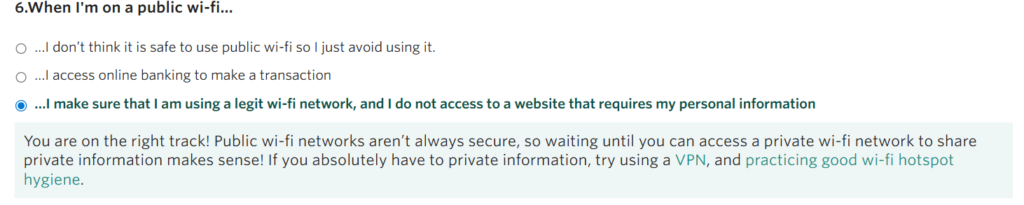
Question 6 from Privacy and Surveillance Quiz: Privacy and Surveillance Quiz – Digital Tattoo

The Government of Canada’s Get Cyber Safe website explains that browsing on public Wi-Fi can be riskier than using a private network. It recommends avoiding sensitive activities, such as accessing bank accounts or making purchases, while connected to public Wi-Fi (Government of Canada, 2020).

Building my Visitor and Resident app made me consider how I use the platforms that make up my digital identity and personal learning network (PLN). Doing this activity, I realized that the platforms I use are dispersed over the horizontal axis (Visitor versus Resident). The map also made me realize that personal and professional digital identities are hard to fully separate. Personal platforms like Instagram can still affect how others see me professionally, while LinkedIn also includes some personal self-expression.
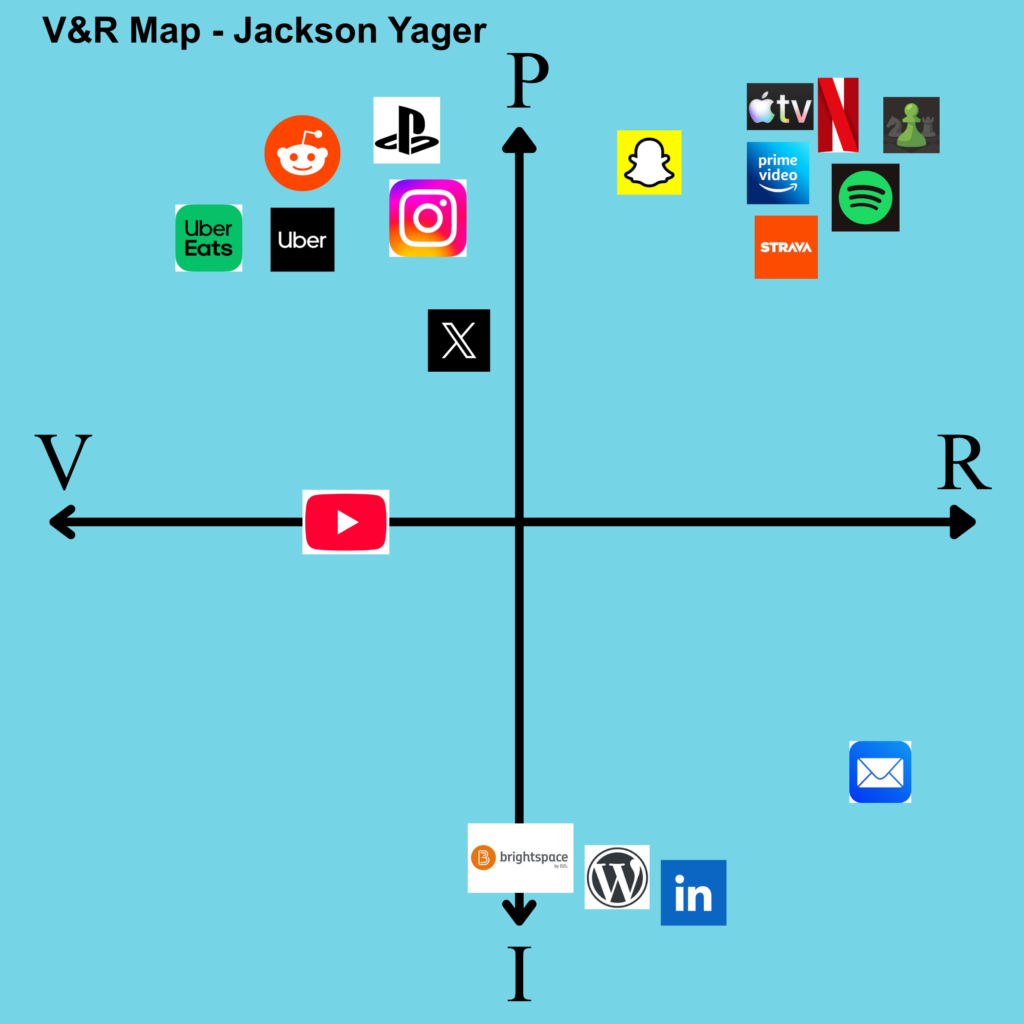
Map made on Canva: https://canva.link/t1o49u0oym10kd9

Shelley Moore’s youtube video https://youtu.be/PQgXBhPh5Zo?si=k9pOsUcEKf6xSIjN on The Evolution of Inclusion made me think about how inclusive my learning environments have been throughout my academic career. Moore explains how the way we treat individuals with intellectual disabilities in learning spaces has progressed from exclusion to segregation to integration to inclusion. Looking back my academic career so far, I can see how individuals with intellectual disabilities have been progressively more included. True inclusion means that learning environments are designed so that everyone can participate meaningfully and have access to the support they need.

The readings this week have made me realize that I could make an effort to create a more diverse PLN for myself. A diverse PLN is valuable because it helps me understand perspectives beyond my own. After graduating with a Health Information Science degree, I will likely be working in a healthcare setting where it is crucial to consider all perspectives to create valuable, culturally-safe healthcare. A PLN should be inclusive, but inclusion does not happen automatically. Clark and Aufderheide (2011) argue that public media platforms need to be accessible and representative of the whole population, and that extra effort is needed to include underserved users.

Social media can allow for better communication by making it easier to share resources, ask questions, and connect with people outside of one workplace. It can also help amplify voices that may not always be heard in traditional professional spaces. However, social media also creates challenges. Messages can be misunderstood or taken out of context which can be detrimental to the organization. In healthcare, this is especially important because workers need to think about professionalism, privacy, confidentiality, and organizational social media policies before posting.

References:

Clark, J., & Aufderheide, P. (2011). A New Vision for Public Media: Open, Dynamic, and Participatory. In Media and Social Justice (pp. 55–67). Palgrave Macmillan US. https://doi.org/10.1057/9780230119796_5

Five Moore Minutes. (2018, October 1). The Evolution of Inclusion: The past and future of education [Video recording]. https://www.youtube.com/watch?v=PQgXBhPh5Zo

Government of Canada, C. S. E. (2020, March 2). Public Wi-Fi. Get Cyber Safe. https://www.getcybersafe.gc.ca/en/secure-your-connections/public-wi-fi?utm_source=chatgpt.com

Moore, S., & Schnellert, L. (2016). One Without the Other: Stories of Unity Through Diversity and Inclusion. Portage & Main Press. http://ebookcentral.proquest.com/lib/uvic/detail.action?docID=4832579
PLN & Public Communications & Digital Identity

Personal Learning Networks

Networking in the age of social media has shifted from traditional face-to-face interactions to digital connections with other professionals. Online platforms support informal learning and allow users to connect with individuals who have similar career goals, hobbies, interests, etc. Social media makes participation easier because it allows people to communicate quickly and reach a wider audience. A Personal Learning Network (PLN) is the group of people, platforms, and digital spaces that help us learn.

Rajagopal et al. (2012) explain that a person creates a PLN when they use contacts in their network to improve their learning. This point highlights that a PLN is not something that is created randomly. Creating a PLN that will help you achieve your goals takes effort. For example, surrounding yourself with experts in your area of study, using the best technology, and sharing your thoughts with others are all ways of actively building a PLN.

Public communication and being active on social media comes with both risks and rewards. One reward is that sharing ideas online can help build confidence and create opportunities. Posting about learning activities or professional interests allows professionals to connect with others in their field. One of the biggest risks of public communications is that anything on that is posted is publicly available forever. This can lead to unintended consequences where posts are misunderstood or taken out context which creates a negative perception of the person or organization who posted. It is important to understand this risk so that people think carefully about how a post could affect their reputation in the future.

Digital Identity

Digital identity is the way a person presents themselves online. This includes posts, comments, likes, profile pictures, etc. All of these can impact the overall impression someone creates through online activity.

Huang et al. (2021) explain that digital identity can be understood as the defining characteristics of a person in online spaces. This definition fits well with social media because a person’s digital identity is not just made up of official information like their name or email address. It also includes how they present themselves through posts, comments, usernames, shared interests, and the communities they participate in. In a Personal Learning Network, others form impressions on a person based on what they choose to share and how they communicate. Digital identity can be difficult to control because online activity can be saved, shared, or interpreted by different audiences in different ways.

Every person has a different way of representing themselves online. Some choose to use Instagram mainly for personal activities like sharing with family and friends, and having a separate professional online presence on professional networking platforms like LinkedIn. Some choose to use Instagram for both a personal and a professional presence. The platforms we use and the information we share is what influences public perception. Mixing professional and personal presence can sometimes be dangerous. A post meant for friends could be seen by employers with missing context.

Conclusion

Ultimately, Personal Learning Networks and digital identity are closely connected. The way we communicate online shapes how others see us, and it also shapes how we learn. By being thoughtful, respectful, and aware of our audience, social media and online learning platforms can be a valuable tool for learning and professional growth.

References

Huang, J., Kumar, S., & Hu, C. (2021). A Literature Review of Online Identity Reconstruction. Frontiers in Psychology, 12. https://doi.org/10.3389/fpsyg.2021.696552 Rajagopal, K., Brinke, D. J., Bruggen, J. V., & Sloep, P. B. (2012). Understanding personal learning networks: Their structure, content and the networking skills needed to optimally use them. First Monday. https://doi.org/10.5210/fm.v17i1.3559

Welcome and Introduction

image showing person walking in pre-painted footprints

Before proceeding with this first blog post, we expect you to consider your privacy preferences carefully and that you have considered the following options:

  1. Do you want to be online vs. offline?
  2. Do you want to use your name (or part thereof) vs. a pseudonym (e.g., West Coast Teacher)?
  3. Do you want to have your blog public vs. private? (Note, you can set individual blog posts private or password protected or have an entire blog set to private)
  4. Have you considered whether you are posting within or outside of Canada? This blog on opened.ca is hosted within Canada. That said, any public blog posts can have its content aggregated/curated onto social networks outside of Canada.

First tasks you might explore with your new blog:

  • Go into its admin panel found by adding /wp-admin at the end of your blog’s URL
  • Add new category or tags to organize your blog posts – found under “Posts” (but do not remove the pre-existing “edci338” category).
  • See if your blog posts are appearing on the course website (you must have the the edci338 category assigned to a post first and have provided your instructor with your blog URL)
  • Add pages, if you like.
  • Include hyperlinks in your posts (select text and click on the link icon in the post toolbar)
  • Embed images or set featured images and embed video in blog posts and pages (can be your own media or that found on the internet, but consider free or creative commons licensed works). To embed a YouTube video, simply paste the URL on its own line.
  • Under Dashboard/Appearance,
    • Select your preferred website theme and customize to your preferences (New title, new header image, etc.)
    • Customize menus & navigation
    • Use widgets to customize blog content and features
  • Delete this starter post (or switch it to draft status if you want to keep it for reference)

Do consider creating categories for each course that you take should you wish to document your learning (or from professional learning activities outside of formal courses). Keep note, however, that you may wish to rename the label of the course category in menus (e.g., as we did where it shows “Social Media & PL” as the label for the “edci338” category menu.  This will enable readers not familiar with university course numbers to understand what to expect in the contents.

Lastly, as always, be aware of the FIPPA as it relates to privacy and share only those names/images that you have consent to use or are otherwise public figures. When in doubt, ask us.

Please also review the resources from our course website for getting started with blogging:

Test Social Media Post

University of Victoria

This post  will appear in a few places:

  1. in the blog feed on the front of your website
  2. in the Learning Design menu on your website. This is because we have applied the “edci338” category to this post and the menu item “Social Media & Personalized Learning” has been created from the category “edci338.” For every post you make for this course, please assign the “edci338” category to it. You are welcome to use this blog for your personal hobbies or for other courses, in which case, you could create additional menu items and categories for them.
  3. if you give permission, your posts categorized “edci338” will be aggregated onto the Blog Feed on the EDCI 338 Course Website.

Feel free to delete this post once you understand this. If you have any questions, please reach out to your instructor.